
Wan 3.0 image to video with first and last frames
A keyframe pins a picture to a moment in the shot. Use your photo as the first frame when the opening matters. If the clip needs to land on a particular composition, place that picture in the last frame slot. The prompt describes what happens in between.
The figure starts side-on by the window and looks back at the camera. Later, a lower viewpoint brings more of the red dress into the shot. Compare the window frame and the lines on the wall at both moments to see how the framing changes.
On this page
From a still image to a first take
Choose the frame that sets the shot
To start a Wan 3.0 image-to-video shot, open Keyframes and upload at least one photo. Use First frame for the opening, Last frame for the ending, or fill both slots for a planned transition. Match angle and crop if the camera is meant to stay still.
Write one motion and a stopping point
Describe who or what moves, where it goes and what the camera does. For a first test, 5 seconds gives one simple movement room to settle. Select the duration in the controls.
Preview the cost and review the cut
Check the credit estimate for your chosen quality and resolution. Play the clip through once for motion and again for the final composition. If it drifts, shorten the movement or align the two photos before the next take.
Photographing a pair of keyframes for a box reveal
To shoot first and last frames for Wan 3.0, frame the box with its lid fully open. That shows you how much space to leave above the closed box. Keep the camera and props in place until you have both photos.
Leave space for the lid
Frame the open box with a strip of background above the lid. Mark the position of the box and the phone support with tape. Lock focus and exposure on the front panel. Close the lid and take the first picture with the same lens.
Show what the lid will uncover
Put the actual contents in the box, open it to the intended angle and take your hand out of frame. Check that the hinge and the item inside are visible in the last photo. A closed lid gives little information about the lining or the object beneath it.
Compare two corners and a background line
In a photo editor, place the open shot over the closed one at half opacity. Apply the same crop to both, then compare the front corners and a line behind the box. If the corners line up but the background shifts, the camera moved between shots. Retake the open photo from the marked position.
When to use a first frame, last frame or reference image in Wan 3.0
Start with the part of the shot that has to match another image. Keyframes place pictures at the ends of the clip. Reference mode takes its own set of inputs and leaves room for a different composition.
| What the shot needs | What to upload | What that choice leaves open |
|---|---|---|
| A station clock must start at the time shown in your photo. | First frame only | The hands and dial have a starting position. Describe how the second hand advances. The ending is free unless you supply it too. |
| A stamp lifts to reveal a particular printed mark for the end card. | Last frame only | Upload the clear impression as the ending. Describe the stamp lifting out of view. Without an opening photo, its initial position and how much paper it covers are left to the model. |
| A book opens from its cover to a page with a pressed leaf. | First and last frames | Photograph both states from above with the spine in the same place. The pictures specify the cover and the revealed leaf. The turn of the page still needs a motion prompt. |
| A cyclist wears the jacket in your photo in a new street scene. | Reference image | Use the jacket as a visual reference and describe the rider, street and camera angle. This gives the new scene room to be framed differently. An exact replica of the original pose is a keyframe task. |
What to watch in two clips from the generator’s Examples tab
A red dress by the windowThe person starts with an index finger resting on each cheek, then turns their head and points to one side. On the first pass, follow the gaze and the pointing finger. Replay the same moment watching the framed picture and TV to see whether the background shifts too.
Three Wan 3.0 image-to-video exercises with your own photos
Keep the lettering on a coffee tin readable
Start with one front-facing pack shot. Give the movement to a reflection so the lettering can stay in place. On playback, check the first and last letters for drift.
Lock the camera. A narrow stripe of morning light travels slowly across the metal lid. Keep the tin still and its front label facing us.
- What to watch on playback
- Pause at the start, as the glint passes, and at the end. Compare the gap between the last letter and the right edge of the tin. If only the bright area moves, the label stays readable.
- Try this replacement
- A small glint travels around the rim of the lid and fades before it reaches the front label.
Open a box on cue
Photograph the same box closed and open without moving the camera. Use those pictures as the first and last frames. Line up the front corners before writing the motion.
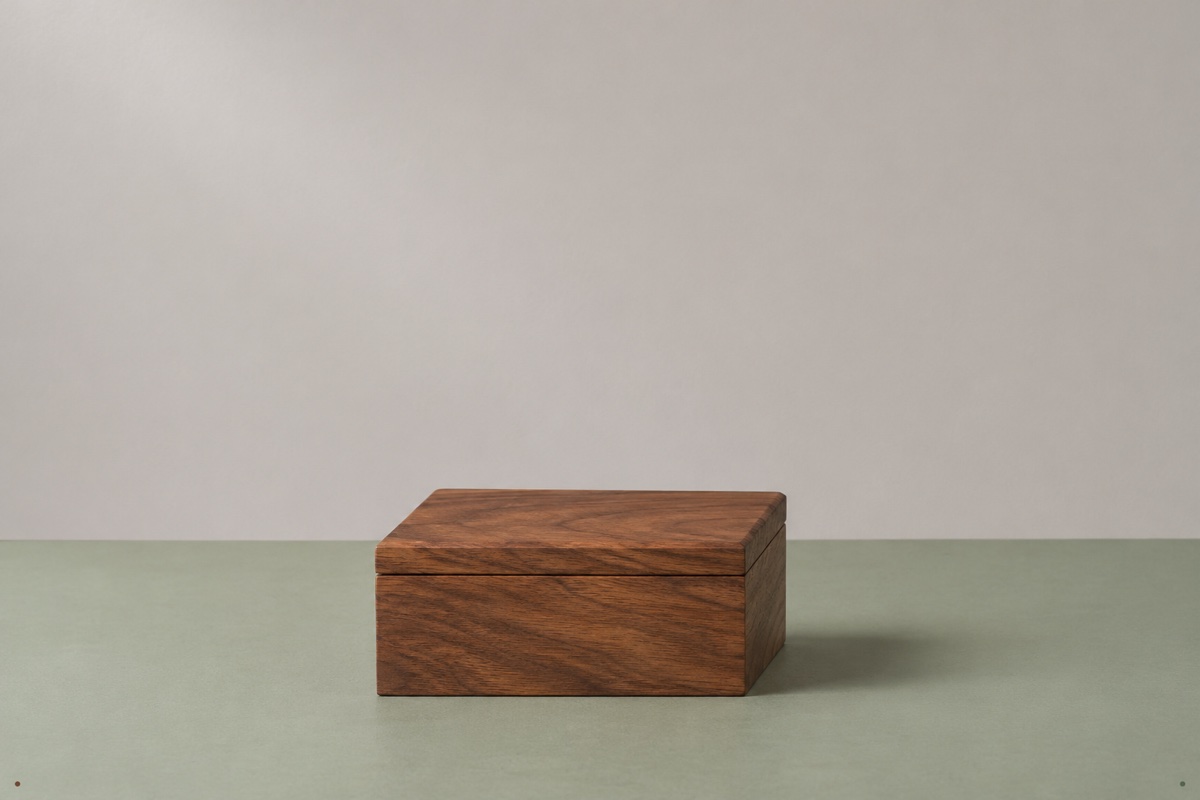
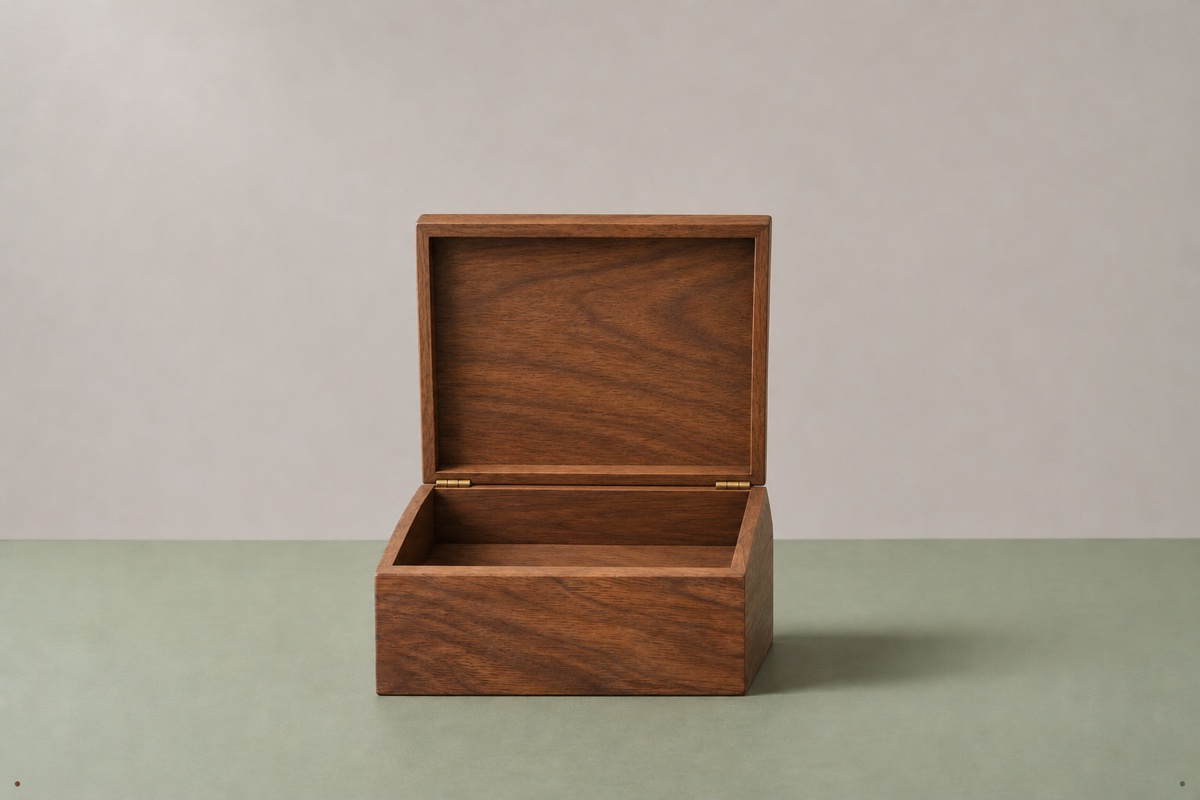
Hold on the closed box for a beat. The lid swings back on its hinge in one smooth movement. End on the open box and hold.
- What to watch on playback
- Watch the rear edge where the lid meets the box. It should stay attached as the front edge rises. A gap halfway through gives away a lid that is floating.
- Try this replacement
- The rear hinge stays in place. The front lip rises in a single arc and settles at the angle shown in the last frame.
Bring a still landscape to life
Begin with a lake photo. Pick one element that can move without changing the composition. Watch the shoreline as a fixed point when reviewing the take.
Keep the wide shot steady. A low bank of mist drifts from left to right above the water. The distant shore stays level.
- What to watch on playback
- Pick a reed that crosses the far shore. Watch that intersection while the mist passes. If it travels sideways too, the whole view is sliding.
- Try this replacement
- The low mist passes behind the foreground reeds. The reeds and their reflections stay in place.
For a shot with several beats or a sound that lands on a specific action, the Seedance 2.5 prompt guide shows how to write the timing.
When a take looks wrong
Before retrying a Wan 3.0 image-to-video shot, save the source photos and note the aspect ratio and duration. Pause where the problem first appears, choose one change below and compare the two clips at that same moment.
The table jumps sideways as the lid opens.
Switch between the two photos at the same size. If the rear table edge jumps there too, the mismatch is already in the sources.
Retake just the ending photo from the original camera position. Keep the prompt for the next run.
A different object appears inside the box.
A closed-box photo hides the contents. If the last frame slot is empty, the reveal has no visual target for the item inside.
Add one last photo showing the intended item in the open box. Keep the opening image and the motion instructions.
The action starts, reverses and starts again.
Read the action verbs in order. A lid asked to open, pause, rock back and settle has several changes of direction in a short shot.
Replace only that line with “The lid swings slowly from closed to open in one continuous arc.” Keep the same duration.
The top of the subject disappears in the vertical cut.
Put a 9:16 crop over the ending photo in your editor. If it crosses the raised lid, the source leaves too little room above it for that cut.
Reframe the two photos as a matched vertical pair with space above the open lid. Keep the 9:16 output and the same movement.
Questions about photo animation
Yes. Put the picture in Last frame and leave First frame empty. Describe how the camera or subject should arrive at that pose. Add an opening image when you also need a particular starting view.
Use Keyframes for a picture that belongs at the start or end of the clip. Use Reference mode when the picture supplies a subject, outfit or visual style and you want the opening composition to remain flexible.
A PNG with an alpha channel can be rejected even if it looks opaque. Flatten it onto a background and export as JPEG or an opaque PNG. Each side must be 240 to 8000 pixels, the longest side at most eight times the shortest, and the file no larger than 20 MB.