
Seedance 2.5 prompts for shots you can direct
When writing Seedance 2.5 prompts, decide what moves first and what you want to see in the last frame. Copy the closest example into the generator, then swap in your subject and the action you want it to take.
In this widescreen animated example, look past the stone giant’s raised arm to find the figure below in the woods. After the cut, look over the dark cloak at the moss-covered giant. The green on the stone helps you recognise the giant as you work out whose view you now share.
On this page
Build a prompt around the last frame
Choose the opening image
For a Seedance 2.5 shot that starts from a photo, upload it as the first frame and use the prompt to describe what changes. Starting with text alone? Name one subject, its position and the direction of the light.
Write the change in one sentence
Name the action, give the camera one job and describe where the motion stops. Set the clip duration in the controls as well. For a long clip, divide that time into beats you can recognise on screen.
Review one variable at a time
Replay once for the subject, once for the camera and once for sound. If the lamp base moves, keep the same photo and duration and add a fixed landmark before you change the camera move.
What should the picture decide, and what should you write?
Sketch the first image and the last image on paper. The difference between them tells you which part of the shot needs a verb.
Starting with words
Give a subject a position before asking it to move. “A cyclist waits on the left edge of an empty street, then rides past the red door” establishes a start, a direction and a finish you can recognise.
Starting with a photograph
Use the first-frame slot if the opening must match your photo. Spend the prompt on what changes, such as the scarf lifting off the cyclist’s shoulder. Name one landmark that should stay put.
Working between two pictures
Use a first and a last frame if you already know both compositions. Trace a plausible path between them. If the cyclist is far away and then close, decide whether the bicycle approaches a fixed camera or the camera travels alongside it.
Bringing in sound
With audio generation on, choose one visible source. For a bicycle bell, describe the rider’s thumb pressing the lever and a short ring at that instant. Add street ambience after the bell has a clear place.
One envelope, three ways to direct the viewer
These Seedance 2.5 prompts start from the same set. A cream envelope lies on the floor under a blue door. Change one line depending on whether the viewer should discover the envelope, see the seal up close or anticipate the hand opening it.
| Loose instruction | Line to try | What to look for |
|---|---|---|
| “Reveal the envelope.” | The blue door opens a hand’s width. Its shadow slides off the cream envelope on the floor. | The reveal should come from the moving shadow. Check that the envelope stays on the same floorboard. |
| “Move in dramatically.” | From floor level, push straight toward the envelope until the red seal fills the centre of the frame. | The seal should grow while the edges of the floorboards spread apart. You can see whether the camera has travelled. |
| “End on suspense.” | Hold on the seal. A hand stops just above it, fingers still open. End before the fingertips touch the paper. | Freeze the final image. The space between finger and paper lets the viewer anticipate the next action. |
Read the cuts in two clips from the generator’s Examples
From overhead to over the shoulderIn the vertical clip, a red-haired woman in a denim jacket and a white cartoon T-shirt walks toward the camera at a street corner. Pause before the change to a bright gown on the red carpet, then just after. Compare the height of her head in the frame and the direction she faces across the cut.
Three Seedance 2.5 prompts to adapt for your next shot
A product reveal from one photo
Start with a front view of a desk lamp as your first frame. Choose adaptive framing and six seconds. The base stays put, so you can judge whether the light and the camera moved as intended.
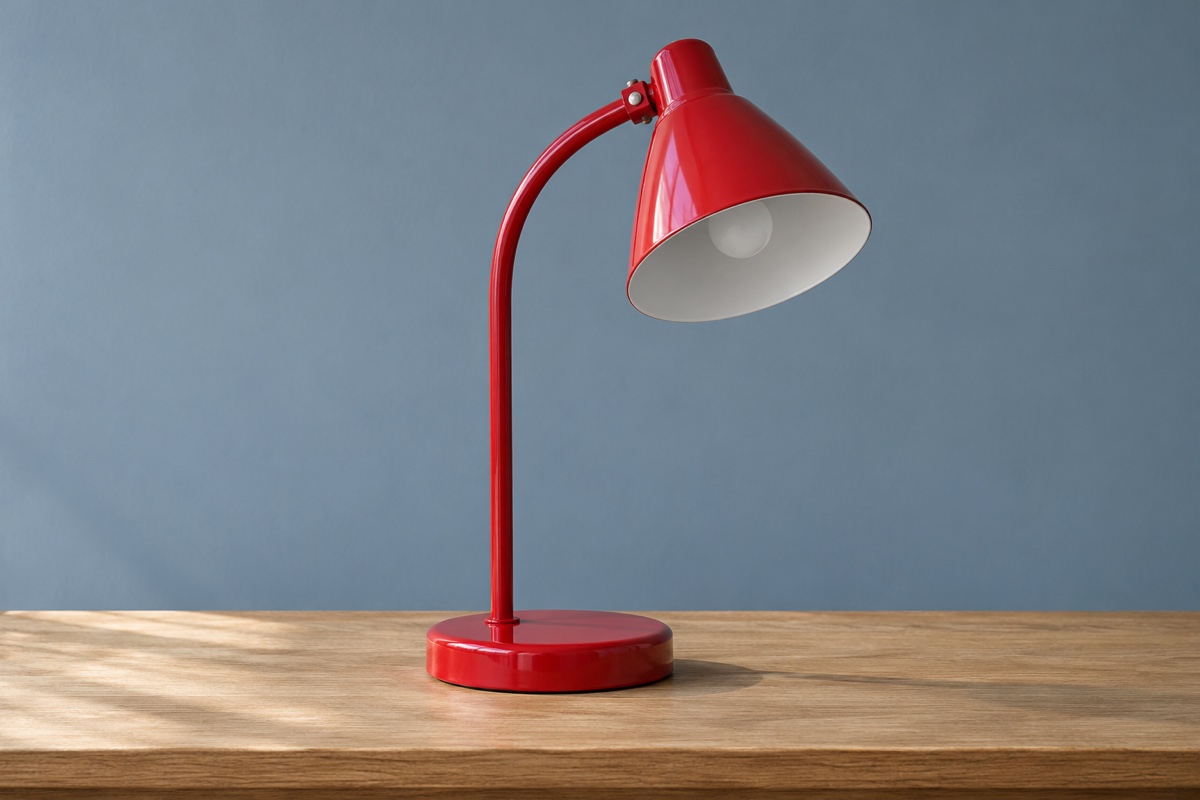
Keep the red desk lamp and its round base in the same spot. The bulb warms from dark to amber. Push in slowly until the rim of the shade fills the upper half of the picture. Hold for one second.
- What to check on playback
- Pause before the light comes up, then again at the end. Does the base slide across the desk, or does it simply grow larger as the camera approaches? If the move hides that distinction, replace the push-in sentence.
- Try this replacement line
- Move straight in just far enough to see the amber light inside the shade, with both edges of the base still in view.
Give a sound a visible cue
To try this sound cue in Seedance 2.5, enter the café prompt without a photo, select eight seconds and turn on audio generation. Listen for the clink as the spoon touches the rim. That point of contact gives you something precise to check on replay.
Lock the camera on a porcelain cup at a quiet café counter. A hand stirs once, taps the spoon on the rim and sets it on the saucer. One bright clink at contact. Keep the soft room tone through the final still frame.
- What to check on playback
- Watch the spoon at normal speed. If you hear a ring during the stir and another when it lands on the saucer, simplify the sentence about the hand for the next take.
- Try this replacement line
- The hand taps the spoon against the rim once, pauses at the point of contact, then lifts it clear of the cup.
A 30-second storyboard in three beats
Set the duration to 30 seconds in the generator. Follow one paper boat through three framings. The time ranges describe the intended rhythm and give you places to check continuity on playback.
0–8 s. Rain eases. At water level, a yellow paper boat drifts out from under a leaf. 8–20 s. Track beside the same boat as it follows the kerb towards a stone arch. 20–30 s. Hold a wide view as the boat enters the arch and its yellow reflection disappears.
- What to check on playback
- At each change of framing, find the bow of the boat before you follow its reflection. If the bridge seems to appear from nowhere, replace only the middle beat.
- Try this replacement line
- 8–20 s. Track beside the yellow paper boat, its pointed bow facing right. The stone arch is already visible ahead and slowly fills more of the background.
Already have photos for the opening and closing frames? The Wan 3.0 image-to-video guide shows how to line them up and describe the movement between them.
When a take looks wrong
When revising a Seedance 2.5 prompt, find the first moment the shot departs from the brief. Keep the rest of the wording and the settings for the next take so you can judge what one edit changes.
The subject changes sides after a cut
Look at its position in the frame immediately before and after the cut. “Follow the rider” leaves travel direction open when the viewpoint changes.
Add one continuity cue to the second shot: “The same rider continues from left to right past the red door.”
The background steals attention
If you notice pedestrians before you notice the hand on the envelope, the background action may be competing with the gesture.
Keep the foreground action and replace the background sentence with “The corridor behind the hand stays empty and still.”
The movement starts again after it should end
Compare the last two seconds. If the hand pulls back and reaches a second time, the prompt may describe reaching without describing rest.
Replace the closing action with “The hand comes to rest above the seal and stays there through the last frame.”
When the first draft misses the brief
Add a last frame alongside the first and describe the movement between them. Use images of the same subject at similar scale for a gentle transition. A sudden change in angle asks for more movement.
Check that the duration control is set to 30 seconds. Give the closing action its own time range. If the boat reaches the arch too late, shorten the middle journey or bring the arch closer to the opening position.
For a silent clip, switch off audio generation. For a specific sound, leave audio on and tie one sound to an object and an action. Listen at the moment of contact before adding music or dialogue.