
FunFun AI: Design Your Character’s Look and Everyday Scenes
Start with the details you would actually recognize: a hairstyle, a pair of glasses, the way a jacket sits. Create a portrait, reuse it as a reference for a new setting, or give it a natural movement in a short video.
Build around recognizable details
A recognizable character starts with a few details worth keeping. Use Kling 3.0 to design the face and wardrobe, try a different everyday setting, and turn a favorite image into a short moving portrait.
Use Seedream 5 Pro reference image editing when you already like the face and want to change a few visible details around it. Once the face works, the FunFun AI creator lets you revise the reference prompt for a new outfit or setting.
Choose a look and a moment from everyday life
Explore character references and short motion studies. Load a scene, adapt its editable prompt, and make the next version your own.
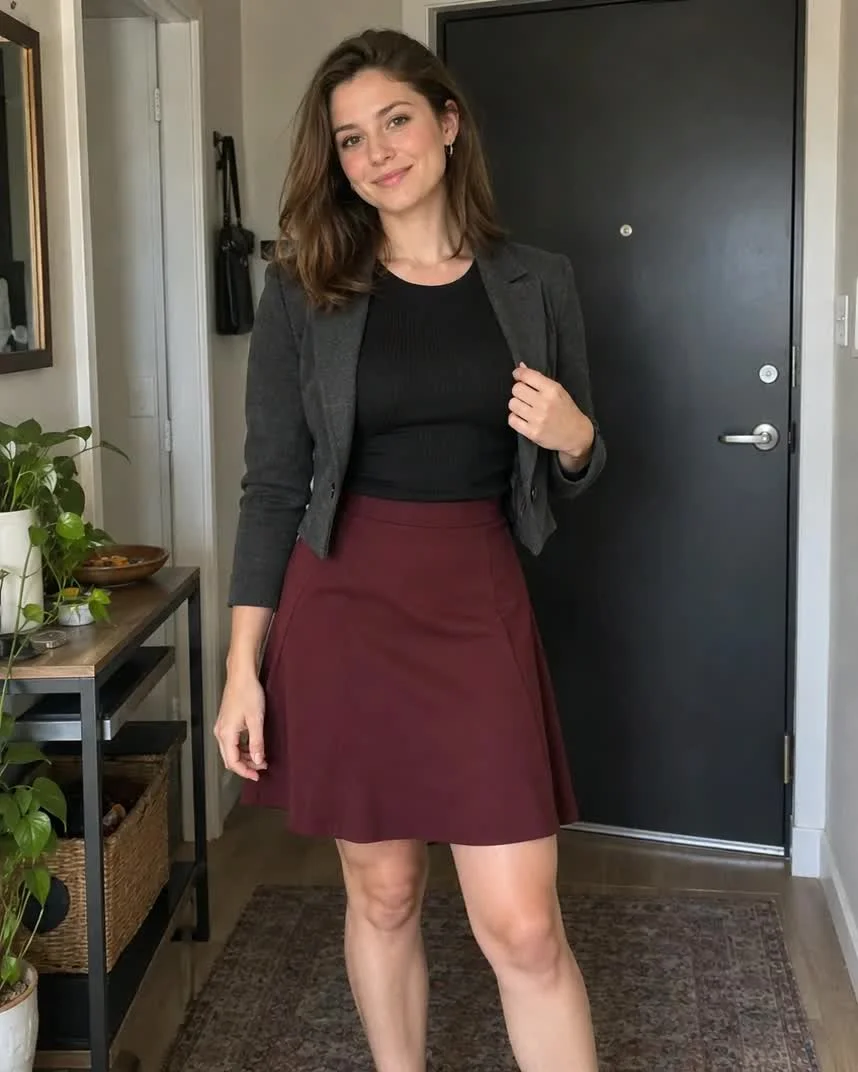
Jacket adjustment
The hand moves down from the jacket as a relaxed smile develops. The charcoal jacket and burgundy skirt keep the look recognizable through the gesture.
Follow the fingers and jacket edge, then check that the outfit and doorway stay consistent.
Creative prompt
 Checking example media…
Preserve the adult woman, face, charcoal cropped jacket, black top and burgundy skirt from the reference image. She makes one small adjustment to the jacket lapel with the hand already beside it, then gives a relaxed smile. Keep the apartment door and plants stable, fingers natural, locked camera, one continuous shot.
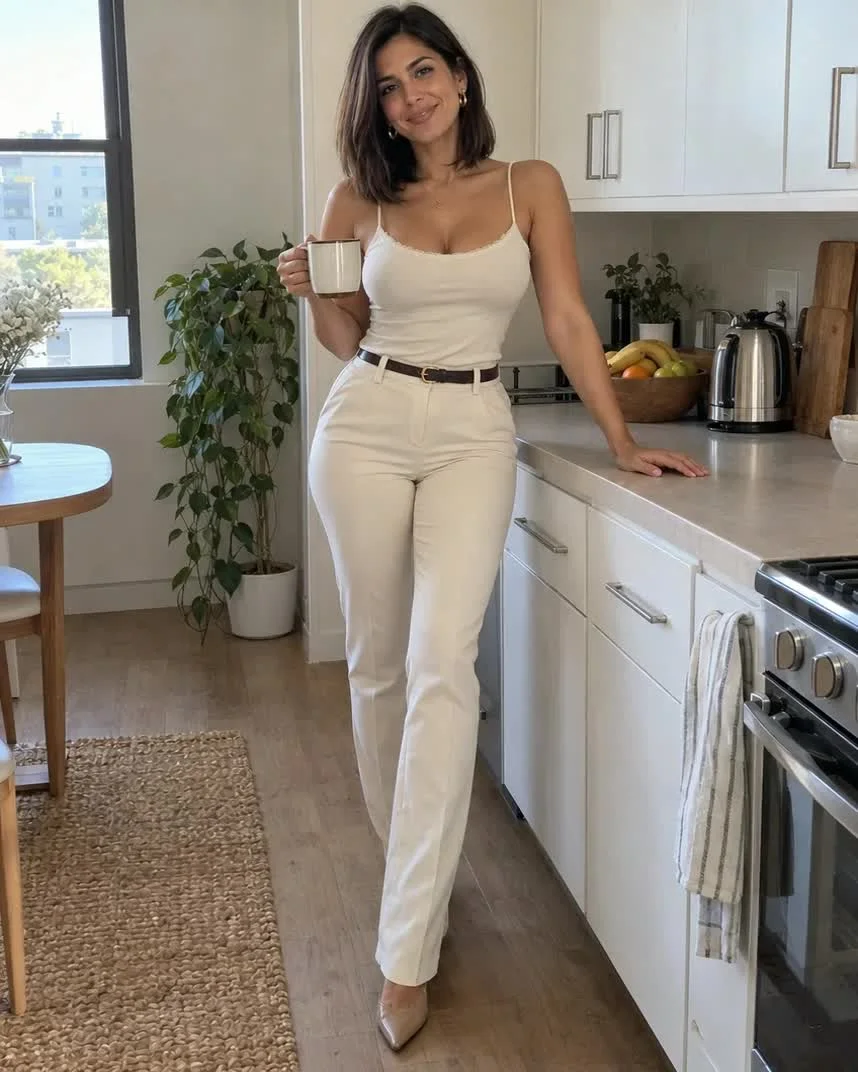
Kitchen morning
A small toast gives the kitchen portrait a clear action. The mug rises and settles back toward the chest while the other hand stays on the counter.
Pause as the mug rises to inspect its shape and the fingers around the handle.
Creative prompt
 Checking example media…
Preserve the adult woman, cream camisole and trousers, mug and kitchen from the reference image. She raises the mug slightly in a small friendly toast and gives a gentle smile, while her other hand stays on the counter. Keep the mug shape and fingers stable, soft daylight, locked camera, one continuous shot.
 Checking example media…
Fitting-room outfit
Keep the outfit readable with a simple mirror angle. The FunFun AI silhouette is the priority.
Check the result for consistent reflections and a clear dress hem.
Creative prompt
A fictional 27-year-old woman wearing a fitted burgundy day dress in a simple shopping-center fitting room, taking a casual full-length mirror selfie, neutral indoor lighting, casual phone in one hand, believable reflections and fabric.
 Checking example media…
After the workout
A standing break beside a park bench gives sportswear a natural setting. Keep the relaxed posture and try a slow breath or a small upward glance as your motion idea.
Check the FunFun AI result for relaxed hands, a balanced standing pose and consistent sportswear seams.
Creative prompt
A fictional 31-year-old adult woman in a fitted coral sports top and navy shorts, standing comfortably beside a park bench after exercise, relaxed expression, soft natural daylight, candid phone photograph, realistic proportions.
 Checking example media…
Poolside break
A simple swimsuit and towel describe a relaxed FunFun AI holiday moment with a comfortable posture.
Check the result for believable limbs, fabric edges and water reflections.
Creative prompt
A fictional 29-year-old woman in a simple dark-green one-piece swimsuit, seated comfortably on a poolside chair with a towel, modest holiday apartment pool in the background, soft late-afternoon sun, candid travel photograph, natural proportions. She holds a water bottle beside the pool.
 Checking example media…
A book on the sofa
A fitted top, relaxed pose and window light make this FunFun AI portrait. Leave room for both hands.
Check the result for natural hands and a relaxed shoulder line.
Creative prompt
A fictional 28-year-old woman in a fitted forest-green top and cream high-waisted shorts, seated naturally on an ordinary living-room sofa, one hand resting on a cushion, afternoon window light, casual phone photograph, realistic skin texture. She holds an open book on the living-room sofa.
Choose how much to change
Use a text prompt for a new look and a reference image when you have visual details you would like to carry forward.
Define the look with concrete features
Specify details that will show on screen, such as “round glasses, short black bob, cream sweater.” Mood words matter more once the main shapes are clear.
Change a single variable first
Start with the same outfit against a new background, or the same room with a new jacket. A limited edit helps you see where the image drifted.
Take the character into an everyday scene
Think about what that person is doing. A mug or a pottery wheel makes a portrait feel like a moment taken from a day.
Use props that fit the action
A ceramic mug supports a slow reach; a cluttered table can hide the hand motion. Keep the main prop visible and easy to recognize.
Keep one feature in view
If the glasses define the look, avoid asking for a quick turn away from the camera. A small glance up offers movement while the full face stays visible.
Let a hobby make the character feel like a person
A character becomes more memorable when the setting hints at how they spend their day. Choose a few objects that belong to the activity and let those details shape the portrait.
A maker at work
An apron, clay-stained fingers and one unfinished bowl tell a pottery story immediately. Use a medium shot to keep the face and work surface together; later, a glance up from the bowl can make a gentle video moment.
Someone who notices the world
A camera strap, sketchbook or folded map gives an outdoor portrait a purpose. Place the object where it can be seen without covering the face, then choose a street corner or path with room for the character to turn.
A familiar moment at home
A mug, open book or bowl of breakfast can turn a plain portrait into a daily ritual. Keep the room specific but uncluttered, so a change of outfit or a new time of day gives you a useful next variation.
Compare features from still to video
Reuse your favorite still as the point of comparison for each revision. The most helpful checks are the details your audience will notice first.
Inspect hair and accessories
Pause on the first and final frames. See whether the hair part and glasses still read the way they did in the portrait.
Check the interaction
Track the hand and prop through the shot. If the reach looks awkward, ask for a smaller hand motion or let the character respond with an expression.
From character brief to finished shot
Work in stages so each decision is easy to check before you move on.
- 1
Establish the character’s look
Create a portrait with clearly visible hair, accessories, and clothing. Keep the version that reads the way you intended.
- 2
Try a new setting with a reference
Use the selected portrait as a reference and change one thing, such as the setting or outfit. Compare the details side by side.
- 3
Add one everyday gesture
Send the still into Video. Ask for a short gesture such as looking up from a table, then check the face and wardrobe through the clip.
Frequently asked questions
What can I make from a character idea?
Create a portrait from a description, refine an image with a reference, or direct a short video from a still or written scene. The image and video tabs keep these creative steps together.
Can I keep the same look in multiple images?
A clear reference and specific instructions help guide a recognizable look. Compare each new version and refine any details that change.
How many credits does a generation use?
The creator shows the current cost for your selected settings before you submit. Image and video generations are separate tasks.
Can I start with a character I have already designed?
Yes. Upload a supported character image and describe which visible details to preserve and what to change. Use the same image in Video when you want to animate the composition.
Design a portrait you can take into another scene
Start with a few visible features. When the look works for you, reuse the image as a reference or explore a short gesture in Video.